
Microsoft Power BI Official Guide for Business Owners (2026)
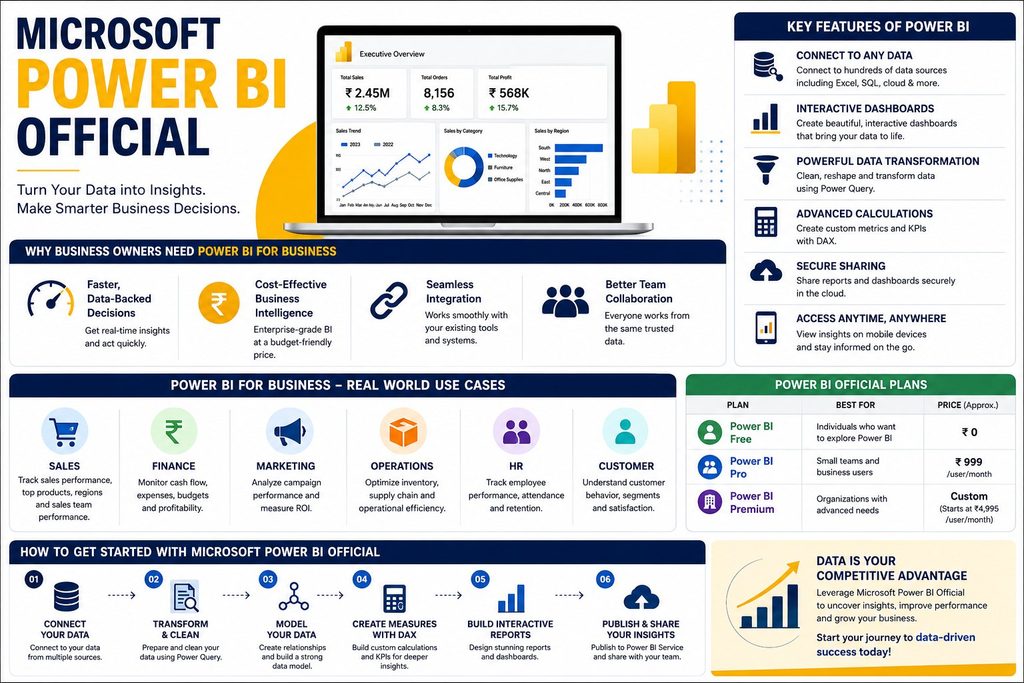
Microsoft Power BI Official tools are quickly becoming the backbone of smart decision-making for businesses of every size. If you are a business owner in Bangalore or anywhere in India trying to make sense of scattered spreadsheets, disconnected sales reports, and guesswork-driven planning, this guide is for you. By the end of this article, you’ll understand exactly what Microsoft Power BI Official software does, why Power BI for Business adoption is exploding, and how to get started — with expert help from Ally Tech Services.
Most small and mid-sized business owners still run their companies on gut feeling. A sales dip gets noticed weeks too late. Marketing budgets get renewed without knowing which campaign actually worked. Inventory gets over-ordered because nobody had a live view of stock movement. These are not people problems — they are visibility problems, and they are exactly what the Microsoft Power BI Official ecosystem was built to solve.
What makes this guide different from a generic product page is context. We’re not just listing features — we’re explaining what each one means for your bottom line as a business owner, how Power BI for Business adoption plays out in real Indian SMBs, and how you can get hands-on with it through structured training rather than trial and error.
Show Image
Image suggestion: Screenshot of a Power BI dashboard with sales KPIs, alt text: “Microsoft Power BI Official dashboard for business owners”
What Is Microsoft Power BI? (Official Definition)
Microsoft Power BI Official is a business analytics platform developed by Microsoft that lets you connect to hundreds of data sources, transform raw numbers into visuals, and share interactive reports across your organization in seconds.
Unlike generic charting tools, the Microsoft Power BI Official suite includes three core components:
- Power BI Desktop — for building reports and dashboards
- Power BI Service — the cloud platform for sharing and collaboration
- Power BI Mobile — for tracking KPIs on the go
For a deeper technical breakdown, you can always refer to the official Microsoft Power BI documentation, which is updated regularly with new features and release notes.
Why Power BI for Business Matters More Than Ever
Business owners no longer have the luxury of waiting a week for reports. Power BI for Business adoption means decisions — hiring, inventory, marketing spend — happen in real time, based on live data instead of stale spreadsheets.
Why Every Business Owner Needs Power BI for Business
Running a business without data visibility is like driving with your eyes closed. Here’s why Power BI for Business has become non-negotiable for growth-focused companies.
1. Faster, Data-Backed Decisions Instead of waiting for your accountant or analyst to compile monthly reports, Microsoft Power BI Official dashboards refresh automatically, giving you real-time visibility into sales, expenses, and customer behavior.
2. Cost-Effective Business Intelligence Compared to enterprise BI tools costing lakhs annually, Power BI for Business plans start at a fraction of the cost — making advanced analytics accessible to small and mid-sized businesses too.
3. Seamless Integration Since Microsoft Power BI Official is built by Microsoft, it connects natively with Excel, SQL Server, Azure, Google Analytics, and hundreds of other tools your business already uses.
4. Better Team Collaboration Teams across departments can view the same live dashboard, eliminating the “whose numbers are correct” confusion that plagues most growing companies.
Common Challenges Business Owners Face Without Power BI for Business
Before adopting Power BI for Business, most companies run into the same recurring roadblocks. Recognizing these early helps you understand exactly what problem Microsoft Power BI Official is designed to solve.
Data Scattered Across Tools – Sales numbers live in one Excel file, finance data in Tally, and marketing metrics in Google Ads or Meta dashboards. Nobody has one single view of the business.
Delayed Reporting – By the time a monthly report is compiled manually, the numbers are already three to four weeks old — too late to correct course.
Manual Errors Copy-pasting data between spreadsheets introduces mistakes that can quietly distort financial decisions for months before anyone notices.
No Way to Spot Trends Early – Without visual trend lines, it’s nearly impossible to catch a slowing product line or a rising customer churn rate before it becomes a real problem.
Overdependence on One Person – Many small businesses have a single “Excel expert” who holds all the reporting knowledge. If they leave, reporting collapses.
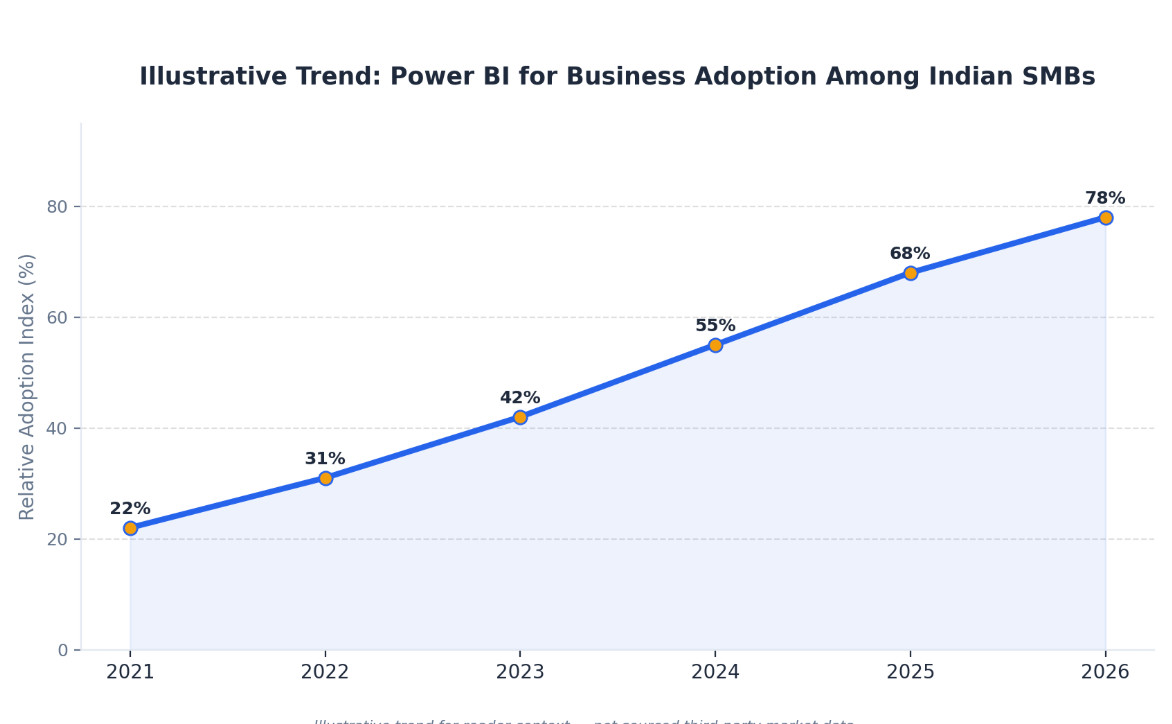
The Microsoft Power BI Official platform directly addresses every one of these gaps — and that’s exactly why Power BI for Business adoption has grown so quickly among Indian SMBs over the last few years.
Key Features of the Microsoft Power BI Official Platform
The Microsoft Power BI Official platform is packed with features designed specifically for business owners who want clarity without needing a data science degree.
| Feature | What It Does | Business Benefit |
|---|---|---|
| Interactive Dashboards | Drag-and-drop visual reports | Instant insight without coding |
| AI-Powered Insights (Q&A) | Ask questions in plain English | No analyst needed for basic queries |
| Real-Time Data Refresh | Auto-updates from live sources | Always current decision-making |
| Mobile App Access | View reports from anywhere | Manage business on the move |
| Data Security & Governance | Role-based access controls | Enterprise-grade data protection |
| Excel Integration | Direct import/export with Excel | Zero learning curve for finance teams |
Learn more about enterprise-grade governance and security standards from independent research firms like Gartner’s Business Intelligence Platform research, which consistently ranks Power BI among top-tier BI solutions.
What sets the Microsoft Power BI Official feature set apart is that none of it requires a dedicated IT team. A business owner with basic Excel knowledge can be building functional dashboards within a single week of focused learning. The AI Q&A feature alone — where you literally type “what were my top 5 products last quarter” and get an instant chart — removes the biggest barrier that used to keep analytics out of reach for smaller companies.
Power BI for Business: Real-World Use Cases
Power BI for Business isn’t just a reporting tool — it’s used across nearly every department. Here’s how different business functions benefit:
| Department | Use Case | Result |
|---|---|---|
| Sales | Track pipeline, conversion rates | Faster deal closures |
| Finance | Monitor cash flow, budgets | Reduced financial risk |
| Marketing | Campaign ROI dashboards | Optimized ad spend |
| Operations | Inventory & supply chain tracking | Fewer stockouts |
| HR | Employee performance analytics | Better retention decisions |
A retail business owner, for example, can use Microsoft Power BI Official dashboards to instantly see which products are underperforming in a specific store location — something that used to take days of manual Excel work.
Mini Case Study: How a Local Retailer Used Power BI for Business
Consider a mid-sized Bangalore retail chain with five outlets. Before adopting Power BI for Business, the owner relied on WhatsApp messages and end-of-day phone calls from store managers to track performance. Stock decisions were made almost entirely on intuition.
After connecting billing software and inventory data to Microsoft Power BI Official, the owner built a single dashboard showing daily sales, best-selling SKUs, and slow-moving stock across all five outlets — refreshed automatically every morning. Within three months, the business reduced dead stock by identifying and discounting slow movers early, and reallocated staff hours to the busiest store locations based on actual footfall data instead of guesswork.
This is the practical, everyday value of Power BI for Business — not flashy dashboards for their own sake, but decisions that directly protect margin.
Microsoft Power BI Official Pricing & Plans
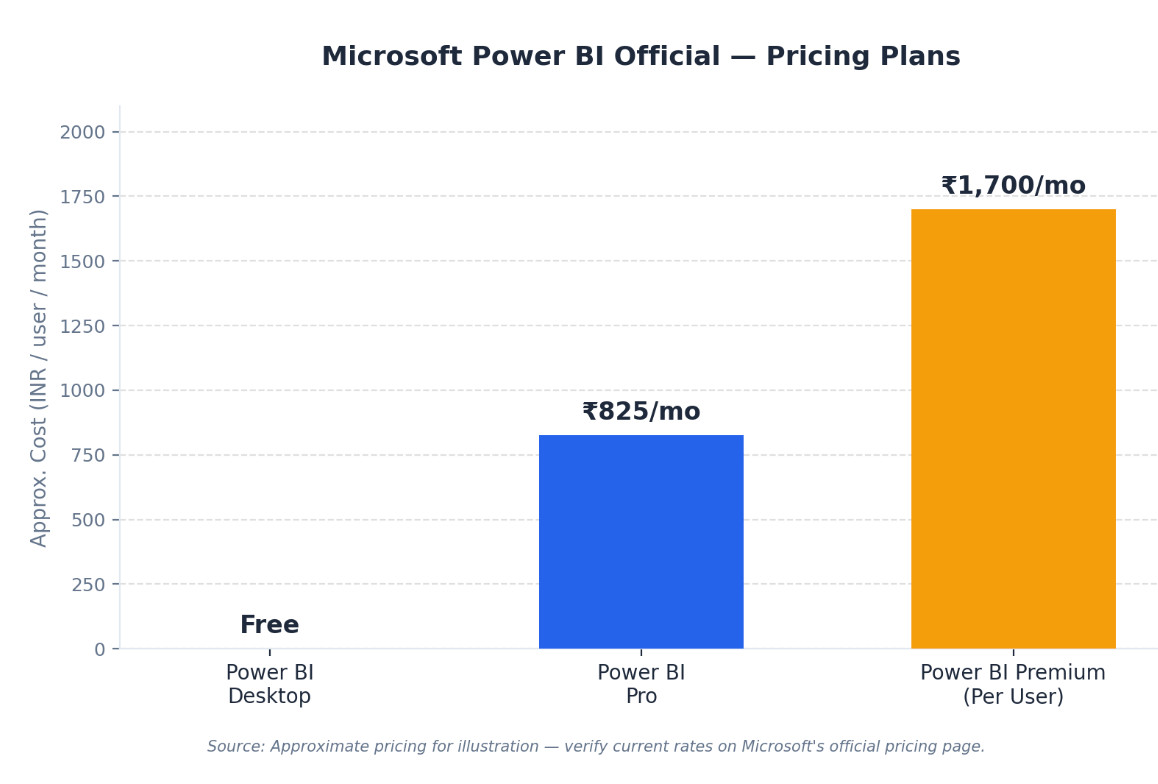
One of the biggest advantages of the Microsoft Power BI Official ecosystem is its flexible pricing, designed to scale with your business.
| Plan | Ideal For | Approx. Monthly Cost (Per User) |
|---|---|---|
| Power BI Desktop | Individuals learning/building reports | Free |
| Power BI Pro | Small businesses, teams | ₹750–₹900 |
| Power BI Premium (Per User) | Growing businesses needing advanced AI | ₹1,600–₹1,800 |
| Power BI Premium (Capacity) | Large enterprises | Custom pricing |
Pricing is approximate and subject to change — always check the official Microsoft pricing page for the latest figures.
Is the Investment Worth It?
When business owners compare the cost of Microsoft Power BI Official licensing against the cost of a single missed inventory call, a delayed marketing pivot, or hours spent manually compiling reports every week, the return on investment becomes obvious within the first quarter. Most businesses recover their annual Power BI for Business subscription cost from time savings alone — before even counting better decision-making.
Power BI for Business vs Other BI Tools
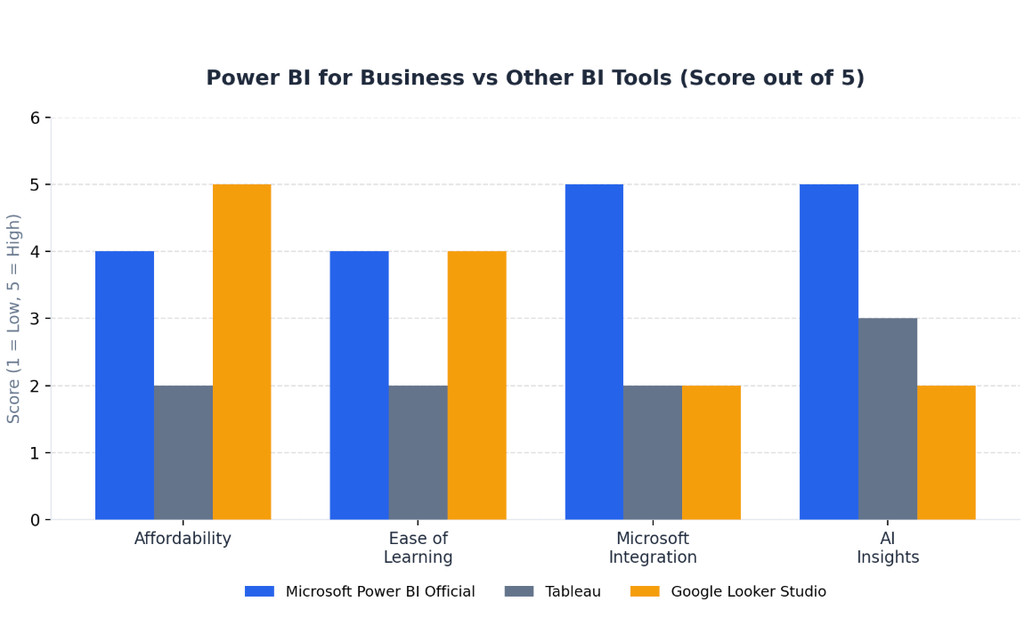
Business owners often ask how Power BI for Business compares to alternatives like Tableau or Google Data Studio. Here’s an honest comparison:
| Criteria | Microsoft Power BI Official | Tableau | Google Looker Studio |
|---|---|---|---|
| Cost | Low–Medium | High | Free (limited) |
| Ease of Learning | Beginner-friendly | Steep learning curve | Beginner-friendly |
| Microsoft Ecosystem Integration | Excellent | Limited | Limited |
| AI-Powered Insights | Strong (Copilot integration) | Moderate | Basic |
| Best For | SMBs to Enterprises | Large Enterprises | Marketing teams |
This makes Microsoft Power BI Official the practical choice for most Indian business owners who already rely on Excel and Microsoft 365.
The Future of Power BI for Business: AI, Copilot & 2026 Trends
The Microsoft Power BI Official roadmap is increasingly centered around AI. With Microsoft Copilot now integrated directly into Power BI, business owners can generate entire reports and summaries using plain-language prompts — no formulas, no DAX code required.
Here’s what’s shaping Power BI for Business adoption going into 2026:
- Natural Language Reporting — describe the report you want and Copilot builds it for you
- Predictive Analytics — built-in forecasting for sales, demand, and cash flow trends
- Deeper Azure & AI Integration — connecting business data directly to machine learning models
- Mobile-First Dashboards — more businesses tracking KPIs from a phone, not a desk
- Embedded Analytics — Power BI reports embedded directly inside business apps and websites
For business owners, this means the barrier to entry for advanced analytics keeps dropping every year. What once required a dedicated data analyst can increasingly be done by the business owner directly, provided they’ve had proper foundational training on Microsoft Power BI Official tools.
How to Get Started with Microsoft Power BI Official
Getting started with Microsoft Power BI Official doesn’t have to be overwhelming. Follow this simple roadmap:
- Download Power BI Desktop for free from Microsoft’s official site — no purchase needed to start learning.
- Connect your data sources — link Excel files, SQL databases, Google Sheets, or accounting software you already use daily.
- Clean and shape your data using Power Query, the built-in tool that removes duplicates, fixes formatting, and merges tables automatically.
- Build your first dashboard using drag-and-drop visuals — bar charts, trend lines, and KPI cards, no coding required.
- Publish to Power BI Service to share live dashboards with your team, partners, or investors.
- Set up automatic data refresh so your reports update themselves daily without manual work.
- Get trained by certified professionals to unlock advanced features like DAX formulas, AI visuals, and Copilot prompts.
💡 CTA: Don’t want to learn this alone? Explore our hands-on Power BI Course in BTM and get dashboard-ready in weeks, not months.
Why Choose Ally Tech Services for Power BI for Business Training
At Ally Tech Services, we specialize in helping business owners and working professionals master Power BI for Business through practical, project-based training — not just theory.
- Expert-Led Training: Learn directly from certified data analytics trainers with real industry experience. Meet our trainers
- Government-Recognized Certification: Add credibility to your resume or business profile. View our govt. certification details
- Complete Data Analytics Ecosystem: Beyond Power BI, we also offer SQL, Advanced Excel, and AI & ML courses in BTM.
- Multiple Bangalore Locations: We train students across JP Nagar, Jayanagar, BTM 1st Stage, BTM 2nd Stage, BTM 3rd Stage, and Bannerghatta.
💡 CTA: Ready to turn your business data into your biggest advantage? Explore all our Data Analytics Courses or Contact Ally Tech Services today for a free consultation.
Frequently Asked Questions
Q1. What is Microsoft Power BI Official used for? Microsoft Power BI Official is used to connect, visualize, and analyze business data through interactive dashboards and reports, helping businesses make faster, data-driven decisions.
Q2. Is Power BI good for small businesses? Yes. Power BI for Business is especially valuable for small and mid-sized businesses because of its low cost, easy integration with Excel, and beginner-friendly interface.
Q3. How long does it take to learn Power BI? Most learners can build basic dashboards within 2–4 weeks of structured training, and become job-ready in 2–3 months with consistent practice.
Q4. Does Ally Tech Services offer Power BI certification? Yes, Ally Tech Services offers government-recognized certification alongside hands-on Power BI training in Bangalore.
Q5. Is Power BI free to use? Power BI Desktop is free for building reports. However, sharing and collaboration features require a Power BI Pro or Premium license.
Q6. Do I need coding skills to use Microsoft Power BI Official? No. Basic dashboards require zero coding — just drag-and-drop visuals. Advanced users may later learn DAX (Data Analysis Expressions) for custom calculations, but it’s optional for most business use cases.
Q7. Can Power BI for Business connect to Tally or accounting software? Yes. Microsoft Power BI Official supports connectors and third-party integrations for popular Indian accounting tools, making it straightforward to pull financial data directly into dashboards.
Conclusion
Microsoft Power BI Official has fundamentally changed how business owners access and act on data. Whether you’re tracking sales, managing inventory, or forecasting growth, adopting Power BI for Business practices puts you ahead of competitors still relying on manual spreadsheets.
The best part? You don’t need to figure it out alone.
🚀 Join Ally Tech Services’ Power BI Course in BTM today and start building dashboards that drive real business results. Explore our full range of courses or get in touch with our team to find the right learning path for you.
About Ally Tech Services
Ally Tech Services is a Bangalore-based data analytics training institute helping professionals and business owners master tools like Power BI, SQL, Advanced Excel, and AI/ML. Learn more about us or browse career opportunities and our blog for more insights like this.