
The phrase “SQL coaching near me” reveals something specific about what you’re looking for. You’re not just searching for an SQL course. You’re searching for one that’s physically accessible — something you can attend in person, in a classroom, with an instructor present.
That’s a deliberate choice, and it’s worth understanding why it’s often the right one for SQL specifically.
SQL is a skill that develops through writing queries, making mistakes, and getting corrected. The correction loop is everything. In online learning, that loop is slow: you write a query, it produces a wrong result, you check forums or rewatch a video, and you may or may not identify the actual problem. In classroom coaching with an experienced instructor present, the correction loop is immediate — your query logic is evaluated in real time, the gap is identified precisely, and you understand why it’s wrong before it becomes a habit.
AllyTech Services in BTM Layout is the nearest quality in-person SQL coaching option for learners across South Bangalore — Jayanagar, JP Nagar, Madiwala, Silk Board, Arakere, Koramangala, HSR Layout, and the surrounding corridor. This page explains what you get from in-person SQL coaching that online learning consistently fails to deliver, and exactly what AllyTech’s programme covers.📞 Phone / WhatsApp: 074110 11500 📧 Email: info@allytechservices.in 📋 Book your free demo class: Contact Us
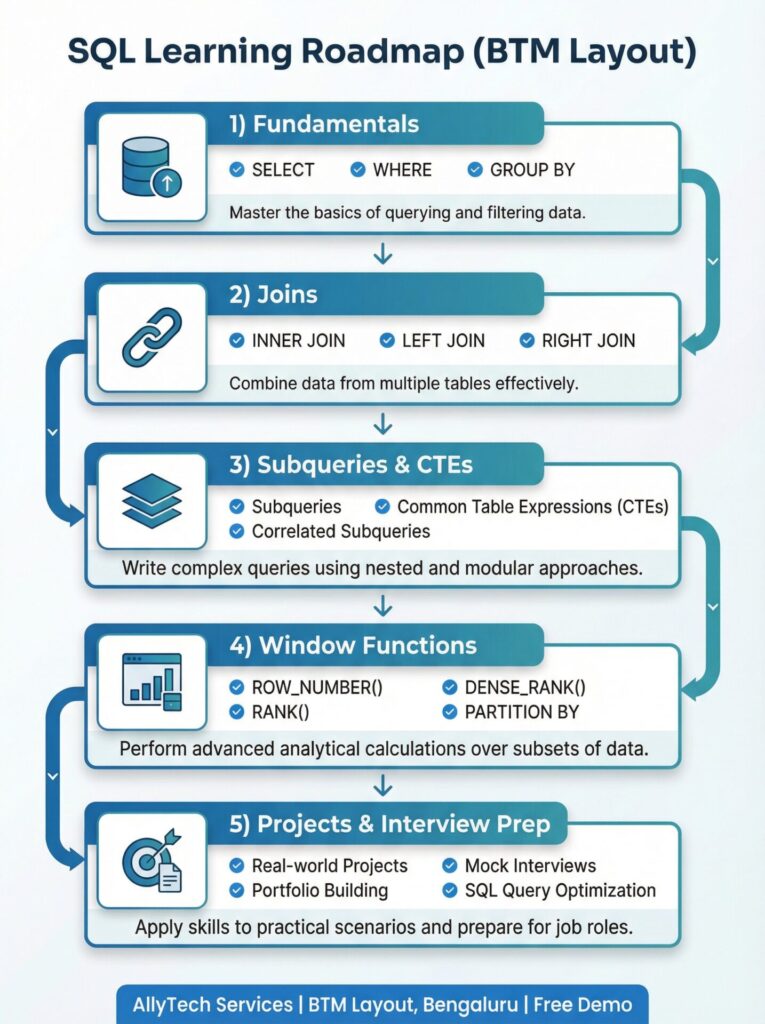
What In-Person SQL Coaching Gives You That Online Learning Cannot
Real-Time Feedback on Query Logic — Not Just on Query Output
Online SQL tutorials give you feedback on whether your query returned the right result. They cannot tell you why your join produced 47 more rows than expected, or why your window function partitioned incorrectly, or why your GROUP BY is filtering at the wrong stage.
This distinction — feedback on logic versus feedback on output — is the core advantage of classroom coaching for SQL. When your instructor can see your query, see your reasoning process, and identify the specific conceptual gap that produced the wrong result, the correction is precise and immediate. You don’t carry the misunderstanding forward into the next concept.
We see the compounding effect of uncorrected logic gaps consistently at AllyTech. Learners who come to us after extended self-study often have small misconceptions from weeks earlier that have been causing persistent errors across multiple topics — without them knowing why. In a classroom setting, those gaps are caught within the first few sessions and corrected before they spread further.
Schema Reading Practice Under Real Conditions
SQL interviews present you with schemas you’ve never seen before. The ability to read an unfamiliar schema — understand what the tables represent, infer how they relate, and immediately know how to join them — is a skill that develops through exposure to variety, not repetition.
Online self-study tends toward the same few teaching schemas: employees-departments, orders-products, users-purchases. Learners become fluent on those specific structures and freeze when anything different appears.
In AllyTech’s classroom sessions, we deliberately introduce different schemas throughout the course. Retail, logistics, HR, finance, user analytics, event tracking — the specific table names and relationships change regularly. By the time you sit for an interview, you’ve already navigated the experience of encountering an unfamiliar database and figuring out how to work with it. That experience doesn’t transfer from repeated practice on a familiar schema; it has to be built by encountering genuine variety.
The Accountability Structure That Keeps Learners Progressing
Self-paced online learning has a well-documented dropout pattern. The flexibility that makes it convenient is the same factor that makes it easy to deprioritise when work, family, or other pressures increase. Most learners who start online SQL courses reach joins, slow down, and quietly stop.
Classroom coaching creates a different structure: you have a scheduled class to attend, an instructor tracking your progress, and co-learners working through the same material. This accountability is not a minor factor — for most people it is the difference between completing a skill and abandoning it.
At AllyTech, batch sizes are kept manageable so that instructor attention is genuinely possible for every learner, not distributed across a crowd. Your progress is tracked, your questions get answered in the room, and if you’re falling behind on a concept, it’s noticed and addressed before you sit in a class where the next concept builds on the one you didn’t fully understand.
Learning From Other People’s Questions
In a classroom, you hear every question — not just your own. The question another learner asks about why a FULL OUTER JOIN produced unexpected results, or why their CTE reference returned an error, is often a question you would have had at the same stage but hadn’t formed yet. Hearing it — and hearing the instructor’s explanation — fills gaps you didn’t know you had.
This ambient learning effect is unique to group classroom settings. It doesn’t exist in online self-study, where you only encounter answers to questions you’ve already thought to ask.
What to Look for in SQL Coaching Near You — Before You Commit
Not all in-person SQL coaching delivers the advantages above equally. These are the specific features that determine whether a classroom SQL programme is worth attending:
Instructor interaction throughout the session — not just Q&A at the end. If the classroom format is essentially a recorded lecture delivered live, with questions only permitted after the class, the feedback loop advantage of in-person learning disappears. The instructor should be watching learners work through problems and responding to what they see.
Multiple dataset schemas used across the course. If every exercise uses the same tables, the schema-reading practice advantage is not being realised. Ask before you enrol whether the course uses varied schemas or a fixed teaching dataset throughout.
Interview communication is practised in the classroom. Writing correct SQL and explaining it under observation are two different skills. The classroom environment is the right place to practise the latter — the instructor can hear your explanation and identify where your reasoning is unclear. If this is not explicitly part of the programme, you’re developing only half of what interviews test.
Small enough batch sizes for genuine individual attention. A classroom of 30+ learners with one instructor cannot provide real-time feedback on individual query logic. The feedback loop advantage breaks down at scale.
A verifiable instructor background. In a classroom setting, the instructor’s professional experience with SQL directly affects the quality of the guidance you receive. You should be able to review this before enrolling.
At AllyTech, all five of these features are present. You can confirm instructor backgrounds here: Our Trainers
Complete SQL Curriculum at AllyTech — What Every Classroom Session Builds Toward
Core SQL — Practised Until Genuinely Fluent
Every AllyTech SQL session builds on confirmed fluency from the previous one. We don’t move to joins until core SQL logic is solid — because join errors almost always have a root cause in a fundamental gap:
SELECT with precise column and alias specification; WHERE with compound conditions using AND, OR, and NOT; NULL handling correctly using IS NULL and IS NOT NULL across filters, aggregates, and joins; ORDER BY for single and multi-column results; GROUP BY across single and multiple dimensions; HAVING for filtering after aggregation — the distinction from WHERE that most self-taught learners misunderstand; COUNT, SUM, AVG, MIN, MAX applied to business scenarios; DISTINCT for deduplication in aggregation; LIMIT and OFFSET for sampling and pagination; CASE WHEN for conditional categorisation within queries; CAST for data type handling in real-world messy data; UNION and UNION ALL for combining result sets; EXISTS, IN, BETWEEN, and LIKE for practical filtering patterns.
Joins — All Types, Multiple Schema Environments
INNER JOIN — matched-record retrieval and understanding what is excluded; LEFT JOIN — preserving the primary table with NULL diagnosis; RIGHT JOIN — mirror of LEFT JOIN, and when to rewrite vs. use directly; FULL OUTER JOIN — complete dataset reconciliation; SELF JOIN — within-table comparisons for hierarchy, sequential, and comparative problems; multi-table joins combining three or more tables in one query; CROSS JOIN — cartesian products and their specific use cases. Each type is practised on at least two different schemas — so join logic transfers to unfamiliar databases, not just the teaching example.
Understanding join keys, primary/foreign key relationships, and the effect of data integrity issues (NULLs, duplicates, unmatched rows) on join results — these are specifically addressed because they’re the source of the most common interview mistakes.
Subqueries and CTEs — From Nested Logic to Structured Thinking
Scalar subqueries in WHERE and SELECT clauses; correlated subqueries referencing the outer query row-by-row; derived table subqueries in FROM clauses; CTEs for named, step-by-step query construction that reads linearly and debugs easily; the decomposition discipline — structuring problem logic before writing a single line of SQL; recursive CTEs for hierarchical data traversal where standard joins are insufficient.
The CTE decomposition habit — one of the most valuable things classroom coaching can install — is specifically practised throughout the course. Learners who develop it write better SQL, explain it more clearly in interviews, and debug it more efficiently in real work.
Window Functions — Complete Applied Coverage
ROW_NUMBER — unique sequential assignment within partitions for deduplication and positioning; RANK — rankings with gap-preserving tie handling; DENSE_RANK — rankings without gaps after ties, and the specific scenarios where this matters; SUM, COUNT, and AVG as window functions for running totals, cumulative metrics, and progressive tracking; LEAD and LAG — row-to-row comparison for period-over-period analysis, churn detection, and sequential event tracking; the “latest record per group” pattern — the most frequently tested window function scenario in Bangalore SQL interviews, combining ROW_NUMBER with PARTITION BY and a date-ordered ranking; PARTITION BY within OVER — what it controls and how it interacts with ORDER BY; NTILE — bucket assignment for quartile and percentile segmentation; moving averages and rolling window calculations for trend analysis.
Applied Classroom Practice
Real dataset assignments after every module; interview-style case study problems combining joins, CTEs, and window functions; query debugging sessions — diagnosing queries that produce wrong results without error messages; query communication practice — explaining solution logic clearly as an integrated classroom skill, not a final module; database concepts used in real projects — primary/foreign keys, basic normalisation, indexes and their performance relevance.
Getting to AllyTech from Your Location
AllyTech Services sits on Bannerghatta Slip Road in BTM Layout 1st Stage — one of South Bangalore’s most accessible locations for learners across the southern and south-eastern parts of the city.
From Jayanagar: Direct route down Bannerghatta Road — 10 to 15 minutes by auto or bus.
From JP Nagar: JP Nagar shares a boundary with BTM Layout. Phase-wise, most of JP Nagar is within a 10-minute commute of the centre.
From Madiwala and Silk Board: Straight down Bannerghatta Road toward BTM — typically under 15 minutes.
From Arakere and Gottigere: On the Bannerghatta Road corridor directly toward BTM — 10 to 15 minutes depending on phase.
From Koramangala: Via Koramangala-BTM connecting roads — 15 to 20 minutes.
From HSR Layout: Via Silk Board junction or direct internal routes — 15 to 20 minutes.
From Banashankari and Basavanagudi: Via connecting roads to Bannerghatta Road — 15 to 20 minutes.
For learners from Bommanahalli, BTM 2nd Stage, BTM 3rd Stage, KEB Colony, and surrounding micro-localities — the centre is directly accessible without navigating central Bangalore traffic.
Batch formats: Both weekday and weekend batches run regularly. Contact us to confirm which batch has current availability and suits your schedule: Contact Us
Free demo class: Attend one complete live classroom session before committing to any batch. No deposit, no advance payment — you evaluate the coaching first. Book your place here.
Certification: Government-recognised certification is provided upon completion. Details here: Recognition
Building Your Analytics Skill Set Beyond SQL
Once SQL coaching is complete, the next skills in your analytics path are:
Advanced Excel — Converts your SQL output into structured, stakeholder-ready reports. Pivot tables, Power Query, XLOOKUP, and Macro automation cover the reporting and delivery layer that MIS Executive and Reporting Analyst roles require alongside SQL.
Power BI — Connects directly to SQL databases and builds interactive dashboards that update automatically. The SQL + Power BI skill pairing is listed explicitly in a large proportion of Data Analyst job postings across Bangalore.
Data Analytics — The business thinking layer: problem framing, KPI design, and analytical communication that creates career progression beyond execution-level work.
Full SQL curriculum and batch enrolment: SQL Course in BTM Broader context of SQL in Bangalore’s job market: SQL Training in Bangalore
Practice Resources to Use Between Sessions
W3Schools SQL Tutorial — Interactive syntax exercises with immediate feedback. Use on the same day as each classroom session to reinforce what was covered — same-day practice is significantly more effective than end-of-week review.
Microsoft SQL Server Documentation — The authoritative reference for function behaviour, NULL semantics, and window frame specifications. Build the habit of going to documentation when something behaves unexpectedly — it develops self-sufficiency faster than searching forums.
Stack Overflow SQL Tag — Real problems from working practitioners. Reading questions and quality answers exposes you to the variety of SQL scenarios that appear in real work — a breadth of exposure that structured exercises alone don’t provide.
Use an interactive SQL tutorial for quick hands-on drills and muscle memory. Source
When you get stuck, learn how to troubleshoot using the SQL community on Stack Overflow. Source
To be job-ready, we also cover essential database and query concepts used in real projects—primary/foreign keys, basic normalization, indexes (and why they matter), plus common interview operators like CASE WHEN, EXISTS, IN, and BETWEEN. Depending on your goal, you may also work with popular databases such as SQL Server (commonly used in many companies), and get exposure to how SQL concepts apply across systems like MySQL and PostgreSQL.
How to choose the best SQL coaching near me (BTM Layout)
Choose SQL coaching that offers (1) hands-on query practice, (2) structured progression from basics → joins → CTEs → window functions, (3) interview question practice, and (4) a clear demo/enrollment process. For a demo and course details, see SQL Course or contact Contact Us
Best next steps after SQL (recommended learning path)
SQL becomes even more valuable when combined with Excel + BI tools:
- Dashboarding: power bi course Source
- Reporting productivity: advanced Excel Course Source
- Full job-track: data analytics course Source
Button/CTA (WP Button):
Start SQL now (Free Demo): SQL Course. Source
Batch Timings / Duration / Fees (Quick Details)
Batch options
- Weekday batches
- Weekend batches
- Fast-track options (subject to availability)
Duration
Duration depends on your starting level (beginner vs upskilling) and batch schedule. For the latest plan, check with the team via Contact Us.
Fees
Fees vary based on batch type and inclusions (projects/interview prep). To get exact fees and the next batch start date, use Contact Us
Class Format
Class format: In-person SQL coaching at our BTM Layout training center. If you want to confirm current online/classroom availability for your batch, check with the team via Contact Us.
How long does it take to learn SQL?
Most learners become comfortable with SQL basics in a few weeks with consistent practice. Reaching interview-ready level (joins, subqueries/CTEs, and window functions) typically takes longer depending on batch frequency and practice time. For the current course plan and timeline, contact AllyTech Services.
What is the SQL course fee in BTM Layout?
Fees depend on batch type (weekday/weekend/fast-track) and inclusions like projects and interview prep. To get exact fees and current offers, request details via Contact Us (Call/WhatsApp/Form).
Service Areas We Cover (Near BTM Layout)
AllyTech Services offers SQL coaching and training for learners across BTM Layout and nearby areas including Jayanagar, JP Nagar, Bannerghatta Road, Silk Board, Madiwala, Bannerghatta Slip Road, KEB Colony, BTM 2nd Stage, BTM 3rd Stage, Arekere, Banashankari, and Bommanahalli.
If you’re searching “sql coaching near me”, “sql classes near me”, or “sql training near me” from any of the locations above, reach out for batch availability, fees, and a free demo class via Contact Us.
Visit or Contact AllyTech Services
AllyTech Services B-1, Bannerghatta Slip Road, KEB Colony, New Gurappana Palya, 1st Stage, BTM Layout 1, Bengaluru, Karnataka 560029
📞 Phone / WhatsApp: 074110 11500 📧 Email: info@allytechservices.in 🔗 Enquire about batch availability, fees, and demo class
→ Attend a free demo — full classroom session, no deposit: Contact Us → Full SQL course syllabus and enrolment: SQL Course in BTM
We do not make placement guarantee claims. Our focus is building the SQL competence, query communication ability, and problem-solving habits that make candidates demonstrably stronger in technical interviews — outcomes depend on consistent practice and personal effort.
Certifications & credibility
View: Government Certifications.
FAQs (SQL coaching near me — BTM)
Do you offer SQL coaching near me in BTM Layout?
Yes, Yes. AllyTech Services provides SQL coaching in BTM Layout 1st Stage, Bengaluru—for batch availability, duration, fees, and a free demo, contact us here: Contact Us
Are SQL classes near me suitable for freshers (BTech/BE/BCA/MCA)?
What will I learn in your SQL coaching (quick overview)?
Do you provide a free demo class for SQL coaching in BTM?
What are the batch options (weekday/weekend/fast-track)?
How long does it take to become confident in SQL?
What are the SQL course fees in BTM Layout?
Do you cover SQL interview questions and job-focused practice?
I want a Data Analytics job—what should I learn after SQL?
Do you provide certificates or recognized training proof?
Where can I practice SQL daily?
Yes. To confirm batches, duration, and fees, contact via Contact Us.